
명함을 아이폰으로 찍기만 하면 ChatGPT가 명함 정보를 정리하고, 내 명함을 상대방에게 이메일로 보내고, Slack으로 알림까지 주는 자동화 워크플로우를 소개합니다. ChatGPT API와 Make(노코드 자동화 도구)를 씁니다.
한눈에 보기
아이폰 단축어로 명함을 찍어 텍스트를 뽑아 Make Webhook으로 보내면, Make의 OpenAI 모듈이 이름·회사·연락처를 JSON으로 정리하고 Slack 알림과 Gmail 이메일을 자동으로 보냅니다. 준비물은 Make 계정, OpenAI API 키, 아이폰 단축어, Slack·Gmail 연결입니다.
명함 자동화는 어떻게 돌아가나요?
- 아이폰 단축어로 명함 사진을 찍고 텍스트를 추출합니다
- 추출한 텍스트와 상대방 이메일 주소를 Make Webhook으로 보냅니다
- Make의 OpenAI(ChatGPT) 모듈이 명함 정보를 JSON으로 정리합니다
- Slack으로 알림을 받고, Gmail로 상대방에게 내 명함 이메일이 자동으로 나갑니다
준비물
- Make 계정
- OpenAI API 키 (ChatGPT API 키 발급 방법 참고)
- 아이폰 단축어 앱
- Slack·Gmail 계정
Make 시나리오 만드는 순서
아래 화면은 2025년 2월에 만든 시나리오 기준입니다. 메뉴 이름이나 모델 목록은 지금 화면과 조금 다를 수 있습니다. 전체 과정은 아래 영상에서도 볼 수 있습니다.
1단계: 시나리오와 Webhook 만들기
Make에 접속한 뒤 ‘Create a new scenario’를 눌러 새 시나리오를 만듭니다.

‘Webhooks’ 모듈을 추가합니다.

Webhook은 외부에서 보낸 데이터를 받아 오는 모듈로, 명함 처리의 시작점이 됩니다. Custom Webhook을 만들고 이름을 입력하면 설정이 끝납니다.
2단계: OpenAI(ChatGPT) 모듈 연결하기
Make에서 ‘OpenAI’ 모듈을 고르고 모델을 선택한 뒤, 명함 텍스트를 JSON으로 바꾸는 프롬프트를 넣습니다. 화면을 만들 때는 GPT-4o-mini 모델을 썼습니다. 프롬프트는 아래 “명함 정보를 JSON으로 뽑는 ChatGPT 프롬프트”에 두 가지 버전으로 정리했습니다.

GPT의 API를 연결하는 방법을 모르는 분은 아래 영상이나 ChatGPT API 키 발급 방법 글을 참고해 주세요.
3단계: 아이폰 단축어 설정하기
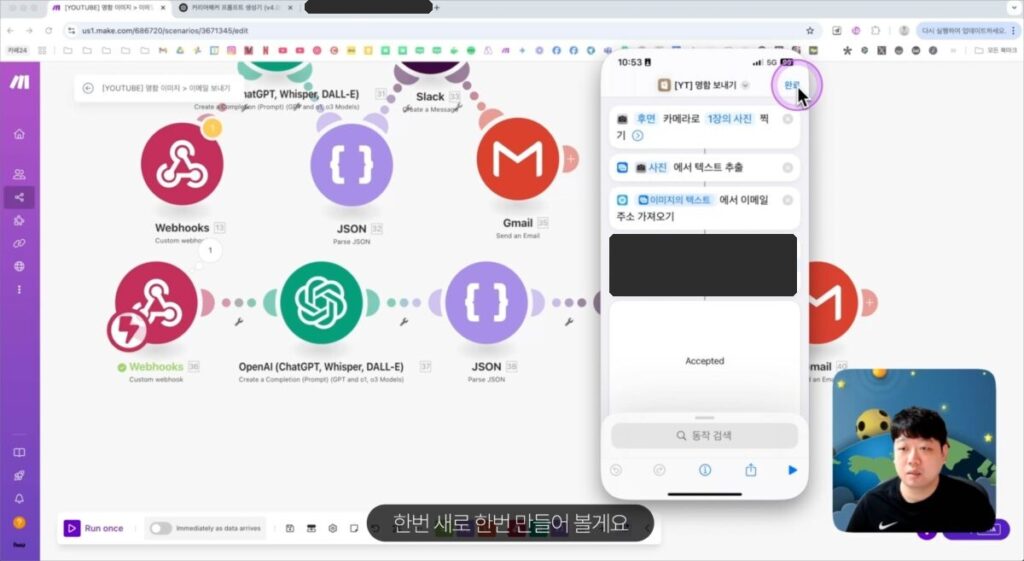
아이폰 ‘단축어’ 앱에서 카메라로 사진을 찍고, 그 이미지에서 텍스트를 추출하는 동작을 추가합니다. 추출한 텍스트와 상대방 이메일 주소를 1단계에서 만든 Webhook으로 보냅니다. 아래 화면대로 설정하면 됩니다.

4단계: Slack 알림 설정하기
‘Create a Message’ 모듈로 Slack을 연결하면 명함이 등록될 때마다 바로 알림을 받습니다. 계정 연결은 User가 아니라 Bot으로 하세요. User로 연결하면 내가 보내는 메시지라서 알림이 오지 않습니다.

5단계: Gmail 이메일 자동 발송 설정하기
Make에서 Gmail의 ‘Send an Email’ 모듈을 추가하고, 받는 사람 주소와 제목·본문을 넣습니다. 제목과 본문에 명함 정보를 넣어 두면 받는 사람이 한눈에 확인할 수 있고, HTML로 만들면 메일이 깔끔하게 보입니다.
HTML 메일은 ChatGPT 캔버스에서 한글로 메일을 먼저 쓴 다음 아래처럼 요청하면 쉽게 만들 수 있습니다.
아래 이메일을 HTML로 만들어줘6단계: 결과 확인하기
아이폰에서 단축어를 실행해 명함을 찍고 이메일 주소와 함께 보내면, Make가 GPT로 명함 정보를 정리한 뒤 Slack 알림과 Gmail 이메일을 보냅니다.
명함 정보를 JSON으로 뽑는 ChatGPT 프롬프트
간단 버전
전화번호를 “01012341234”처럼 숫자만 남기는 짧은 프롬프트입니다. 마지막 줄의 {{13.text}}는 Make에서 단축어가 보낸 명함 텍스트를 넣는 자리입니다.
You are an AI extracting structured data from business cards into JSON format.

# Important Guidelines:
- Output ONLY the JSON object without markdown code blocks
- All phone numbers must be in "01012341234" format (remove spaces, hyphens, dots, +82 prefix)
- Missing information should be marked as "(빈칸)"
- Add "https://" to website URLs if missing
- Multiple emails should be in an array

# Required JSON Structure:
{
  "name": {
    "korean": "전시진",
    "english": ""
  },
  "job_title": "대표 | 협업툴 컨설턴트",
  "company": "시리얼",
  "phone": {
    "mobile": "01012341234",
    "work": "",
    "fax": ""
  },
  "email": ["milk@sireal.co"],
  "website": "",
  "address": "",
  "department": "",
  "extra": {
    "services": ["Notion", "Google", "Slack", "ChatGPT"]
  }
}

# Phone Number Examples:
"+82-10-1234-1234", "010-1234-1234", "010.1234.1234" → "01012341234"

Analyze the business card information and generate the JSON output:

input: {{13.text}}
자세한 버전
항목 설명과 출력 예시를 더 자세히 적은 프롬프트입니다. 마지막 input: 뒤에 단축어가 보낸 명함 텍스트를 연결하세요.
You are an advanced Natural Language Processing (NLP) AI specialized in extracting structured data from business card text.
Your task is to analyze the provided business card information and convert it into a structured JSON format.

# Constraints:
## 0. 아주 중요한 지침:
"```JSON"과 같은 단어는 제외하세요. 반드시 "{}"와 "{}" 안의 내용만 출력하세요.

## 1. 공통 필수 변수:
1. **name**: 이름 (영어/한글 구분 가능하면 분리)
2. **job_title**: 직책
3. **company**: 회사명
4. **phone**: 전화번호
- mobile: 모바일 번호
- work: 직장 번호 (존재하는 경우)
- fax: 팩스 번호 (존재하는 경우)
5. **email**: 이메일 주소 (여러 개가 있으면 배열로 저장)
6. **website**: 웹사이트 URL (존재하는 경우)
7. **address**: 주소 (존재하는 경우)
8. **department**: 부서 (존재하는 경우)
9. **extra**: 추가 정보
- 특이사항(예: 컨설팅 분야, 주요 서비스 등)

# Output Format:
{
"name": {
"korean": "전시진",
"english": "(빈칸)"
},
"job_title": "대표 | 협업툴 컨설턴트",
"company": "시리얼",
"phone": {
"mobile": "010-1234-5678",
"work": "(빈칸)",
"fax": "(빈칸)"
},
"email": ["milk@sireal.co"],
"website": "(빈칸)",
"address": "(빈칸)",
"department": "(빈칸)",
"extra": {
"services": ["Notion", "Google", "Slack", "ChatGPT"]
}
}

# 2. 정보 자동 분류 및 보완:
- 전화번호는 국가번호 (+82) 형식으로 변환합니다.
- 이메일이 여러 개 있을 경우 배열로 저장합니다.
- 웹사이트 URL이 `http://` 혹은 `https://` 없이 적혀 있으면 `https://`를 자동으로 추가합니다.
- 누락된 정보는 **"(빈칸)"**으로 표시합니다.
- 기타 특이사항(컨설팅 분야, 제공 서비스 등)은 `extra` 필드에 저장합니다.

# 3. 작업 내용:
- 주어진 명함 정보를 분석하여 필수 정보를 추출합니다.
- JSON 형식의 일관성을 유지하며 데이터를 정리하여 출력합니다.
- 누락된 정보가 있을 경우 **"(빈칸)"**으로 명확히 표시합니다.

Now, analyze the provided business card information and generate the structured JSON output.

input:
프롬프트 주요 기능
- 전화번호 정규화: +82, 하이픈, 점 등을 제거하고 통일된 형식으로 변환
- 빈 정보 처리: 누락된 정보는 “(빈칸)”으로 표시
- URL 자동 보정: https:// 없는 웹사이트 주소 자동 추가
- 다중 이메일 지원: 여러 이메일을 배열로 처리
- JSON만 출력: “`JSON 같은 표시 없이 중괄호 안의 내용만 출력해 다음 모듈에서 바로 쓰기
자주 묻는 질문
Slack 알림이 안 와요.
Slack 연결을 User가 아니라 Bot으로 하세요. User로 연결하면 내가 보낸 메시지라 알림이 오지 않습니다.
GPT 답에 “`JSON 같은 글자가 붙어요.
프롬프트에 중괄호 {} 안의 내용만 출력하라고 지정하세요. 이 글의 자세한 버전 프롬프트에서 0번 지침이 그 역할입니다.
비용이 드나요?
OpenAI 모듈은 ChatGPT 구독과 별도로 API 사용료가 듭니다(ChatGPT API 키 발급 글 참고). Make는 무료 플랜에 월 1,000크레딧이 있고, 모듈이 한 번 동작할 때마다 대부분 1크레딧을 씁니다(Make 요금 페이지, 2026년 10월 19일 확인).
마무리
ChatGPT와 Make, Gmail, Slack을 연결해 두면 명함을 찍는 것만으로 정보 정리와 내 명함 발송이 끝납니다. 네트워킹 뒤에 명함을 정리하는 번거로움이 줄어들어 영업 활동에 도움이 됩니다.
궁금한 점은 유튜브 영상에 댓글로 남겨 주세요!
같이 보면 좋은 글
작성: 전시진 | 시리얼(Sireal)

Comments are closed.